Keep Every Dropdown and Contact List Automatically Up to Date
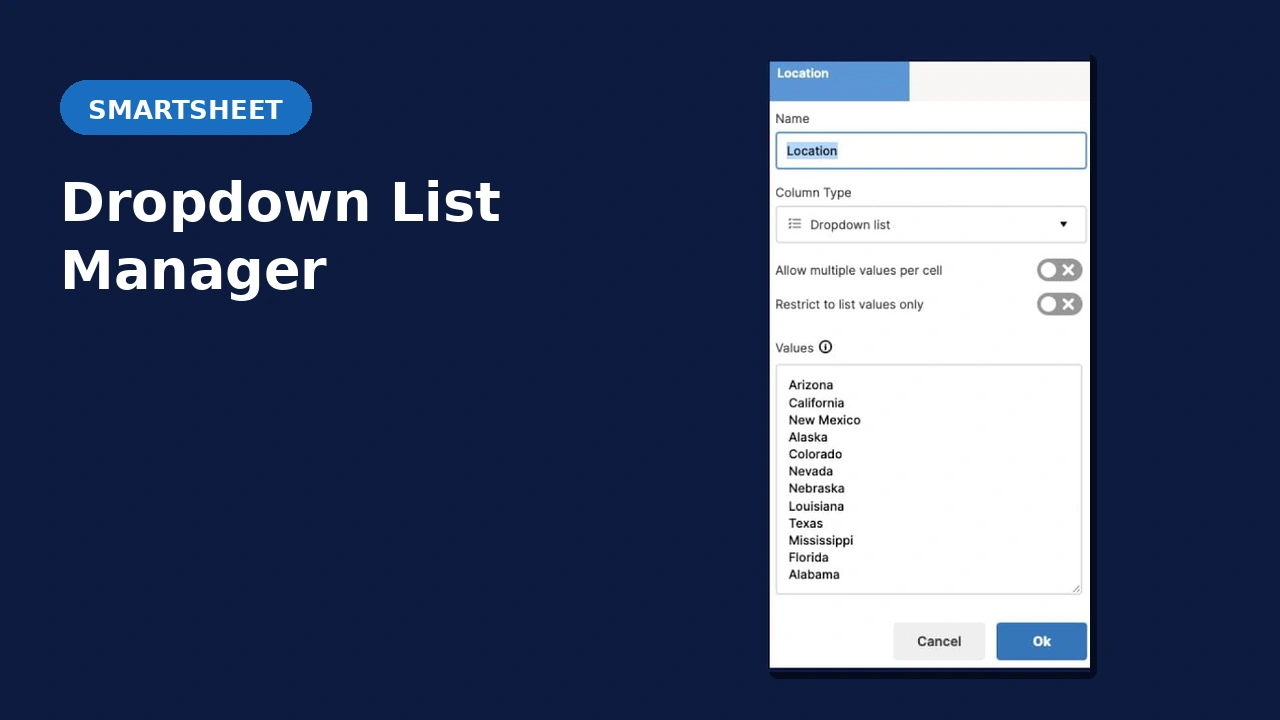
Manually updating dropdown and contact lists across dozens of Smartsheet sheets is a maintenance nightmare. The Dropdown List Manager eliminates it by pulling values automatically from a source sheet or filtered report so every list stays current without anyone touching it.
Find out if this solution is right for you:
Does Any of This Sound Familiar?
The Stale List Problem
You built the perfect sheet with exactly the right dropdown values. Your colleagues copied your amazing sheet, but now there are dozens of versions out there with no reliable way to keep the lists in sync.
The Directory Problem
Your company directory lives in Smartsheet. People join, people leave, roles change. Keeping contact lists accurate across all your sheets is a full-time job nobody signed up for.
The Manual Update Problem
Even with Control Center, global updates to dropdown values are still manual. Someone has to remember to do it, then find every affected sheet. That’s not automation, that’s scheduled maintenance.
Smartsheet Built-in Dropdown Linking vs Dropdown List Manager
| Capability | Smartsheet built-in | Dropdown List Manager |
|---|---|---|
| Configuration scope | Must be configured for every destination sheet. Difficult to retrofit at scale. | One config updates unlimited existing sheets by targeting Folders and Workspaces. |
| Source type | Sheets only. Reports not supported as a source. | Reports supported as a source, enabling filtered, more accurate dropdown values. |
| Data types | Text/Number only. Contact list columns not supported. | Contact list columns supported. Also updates summary field dropdowns. |
| Config tracking | No centralized view. Hard to track what is configured. | Centralized config sheet lists all active configurations. |
Common Questions
What Smartsheet plan is required?
Business or Enterprise. The Dropdown List Manager uses the Smartsheet API, which requires API token generation. The Pro plan does not support API tokens.
Can’t I just use Smartsheet’s built in drop-down linking capability?
Yes you can if it works for you. Here are the limitations vs our solution:
1 – Sheet-Based Configuration
Configuration has to be carried out individually for EVERY DESTINATION SHEET. This is fine if you’re setting up new sheets from a template but it would be very difficult to retrofit to existing sheets at scale. Our solution can update as many existing sheets as you like from one configuration by targeting Folders and Workspaces.
2 – Limited Source Type
Source must be SHEETS ONLY and not Reports. Our solution can use columns in Reports as the source providing data filtering to create a more accurate dropdown data set.
3 – Limited Data Type
Only Text/Number columns can be updated, NOT Contact List types. Our will allow updates to Contact List columns. It can even update dropdowns in summary fields!
4 – No Centralized Tracking
Difficult to keep track of the configurations as there is no centralized config sheet. Our solution has a centralized config sheet that provides a complete list of all existing configurations.
I already have Control Center. Is this still useful?
Yes. Control Center can apply global updates to dropdown values, but only on sheets created within Control Center, and the updates are still manual. The Dropdown List Manager updates automatically when the source sheet changes, and works across any sheet in your environment.
Can I filter which values appear in a contact list based on role?
Yes. A common implementation pulls from a company directory sheet and includes employees in specific contact lists based on their job role column. The right people appear in the right lists automatically.
How does implementation work?
Book a free consult and we’ll discuss whether this solution fits your environment. From there you provide the required account details and the add-on is configured for you.
See It in Action
Ready to Stop Maintaining Lists Manually?
Book a free 30-minute consult. We’ll review your Smartsheet environment, confirm this solution fits, and walk through how implementation works.
Free 30-minute consult · No obligation