Know Exactly When Every Task Is Ready to Start
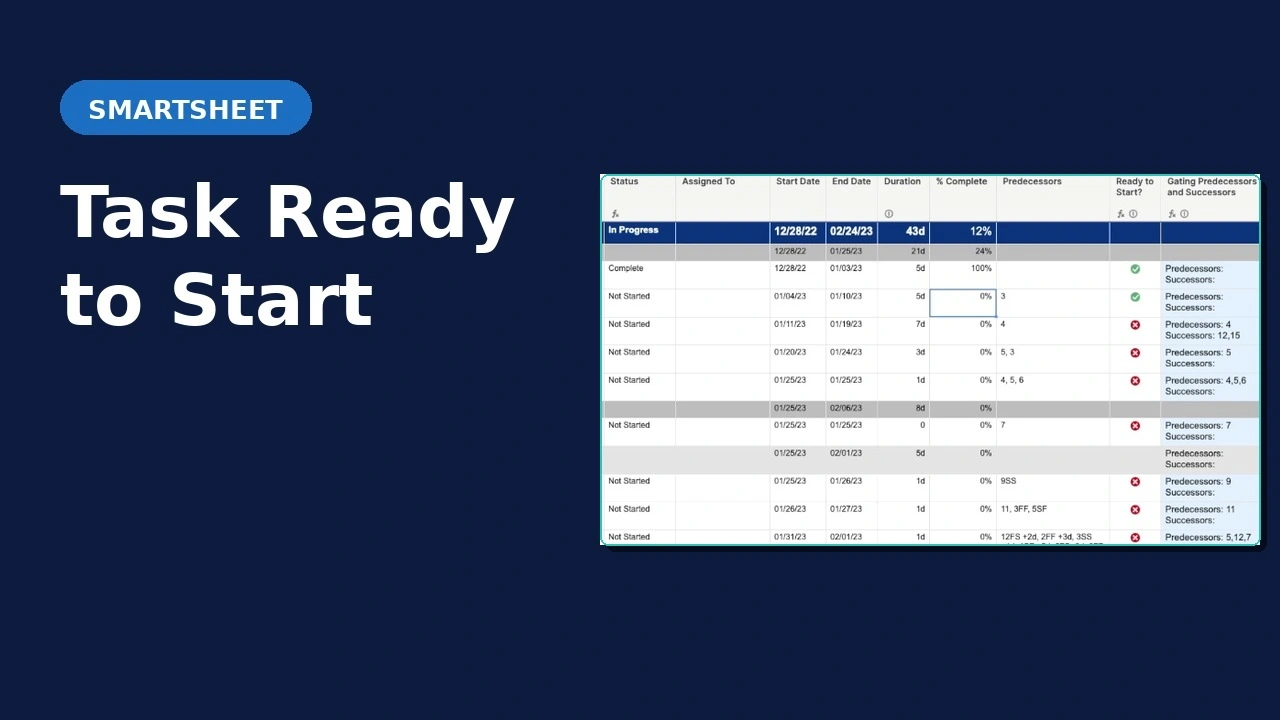
Smartsheet doesn’t have a built in way to tell assignees when their task is ready to start. With the Smart Workflow Guru Task Ready to Start Template, assignees can be notified automatically when their task is ready to start based on the predecessor and successor statuses.
Template starts at $500 with customizations availble.
Let’s determine if this solution is right for you

What This Solution Does
Ready-to-Start Detection
Automatically evaluates every task against its dependencies. Finish-to-Start predecessors must be 100% complete. Start-to-Start predecessors must be in progress. Start-to-Finish logic is handled correctly too.
Gating Item Identification
The solution identifies which specific predecessor or successor is the blocking item, so your team knows exactly what needs to move before they can start.
Workflow Triggers
Connect the ready-to-start flag to a Smartsheet automation to notify the task owner the moment their task unblocks.
Common Questions
Does this only work for Finish-to-Start predecessors?
No. The solution handles Finish-to-Start (FS), Start-to-Start (SS), and Start-to-Finish (SF) dependency types. Lead and lag time on predecessors don’t affect it either.
Can this trigger a notification to the task owner?
Yes. A common implementation is pairing the ready-to-start flag with a Smartsheet automation that notifies whoever is in the Assigned To column. When the flag flips, the notification fires automatically.
What Smartsheet plan do I need?
Any Smartsheet plan is sufficient. The solution runs on core Smartsheet features, so no add-ons or premium features are needed.
How does implementation work?
Book a free 30-minute consult. We’ll look at your setup together and determine whether you need the solution as-is or with customizations. From there, implementation is straightforward.
See It in Action
Ready to Stop Chasing Task Status?
Book a free 30-minute consult. We’ll review your setup, confirm this solution fits, and talk through any customizations you need.